Scan, price and list Cyberpunk TCG cards in one workflow
Photograph or scan your Cyberpunk TCG cards in English or French. NeoSatoshi reads the name, the set code and the printed number, keeps Beta and Retail printings apart with their own prices, and turns the batch into eBay, Shopify or Cardmarket listings.
Built for the way Cyberpunk TCG cards are sold
Card detection from photos and scans
Upload photos or scans of single cards, or photos with several cards such as a binder page. NeoSatoshi reads the name and the number on the corner tag (for example 132, B132 on a Beta card, or 005a) and adds the set, rarity, type, colour, cost, finish, a confidence value, alternative matches and current market prices. A wrong match is fixed with the manual search by name or number.
English and French cards
English and French cards are supported, with the card images of each language shown in the table. A French card keeps its French name in the table, and your listings use the English name with the word French, so buyers find it.
Prices per printing
Cardmarket prices in EUR for English and French cards, or in CHF or USD at the daily exchange rate, plus TCGplayer prices for English cards, always for exactly that printing, Beta or Retail.
eBay Direct Listing and CSV
Publish straight to your eBay account or download the eBay CSV. The title reads like "Cyberpunk TCG V: Streetkid WNCB B005a Rare", and game, manufacturer, set, card number, rarity and finish are filled in as item specifics.
Shopify products
Create products directly in your Shopify store, with a dry-run preview first, or export a Shopify CSV. The set code and the printed number go into the title, so Beta and Retail never get mixed up. NeoSatoshi is also available as an app in the Shopify App Store.
Cardmarket, custom exports and API
Download the TCGPowerTools import file for Cardmarket, or a custom CSV or JSON export for other tools. Developers can send Cyberpunk TCG cards to the Detection API with "tcg": "cyberpunk".
Daily price sync that never guesses
On the Business plan or higher, the daily price sync keeps your eBay and Shopify prices current, each printing from its own price. A printing it cannot pin down is skipped, and a price you typed by hand is left alone.
Watched scan folder for document scanners
In desktop Chrome, Edge, Brave or Opera, NeoSatoshi watches the folder your scanner saves to, adds new JPEG or PNG scans automatically and pairs fronts and backs. Any document scanner that saves images into a folder works, with one card per scan.
Beta or Retail: the printing decides the price
The set code and the printed number are the printing. WNC 132 is the Retail card, WNCB B132 the Beta card with the β before the number, and both are in every listing title, because they are what buyers search for.
The finish is fixed per printing: Common and Uncommon cards are normal, Rare and above are foil. There is no foil switch to forget, and the finish goes into the eBay item specifics.
When the photo does not show the β or the number, the row has no price and shows the printings to pick from, the Retail one first. It is never filled with a minimum price or another printing's price.
When the card could not be read for sure, the row stays open until you pick. Search by name or number to find the right card fast.
French cards take the Cardmarket price of the same product. Some new promos, demo deck cards and Beta prints have no market price at all, so NeoSatoshi asks you for one instead of inventing it.
All 17 sets and products are in: Welcome to Night City, the starter decks The Heist and Embracing Power, their Beta prints, box toppers, pre-release cards, promos, the demo decks and the prize cards of organised play.
Best fit for this workflow
Fit 1
You list singles in volume
Typing name, set code, number and rarity for every card is the slow part. Detection fills them in for the whole batch, and you only decide what the photo cannot show.
Fit 2
You sell Beta and Kickstarter cards
When a Beta card and its Retail print look the same but sell at very different prices, the wrong pick costs money. NeoSatoshi asks instead of guessing and shows the price of every printing.
Fit 3
You sell English and French cards
Both languages go through the same batch, each with its Cardmarket price, and French cards are listed under their English name so buyers find them.
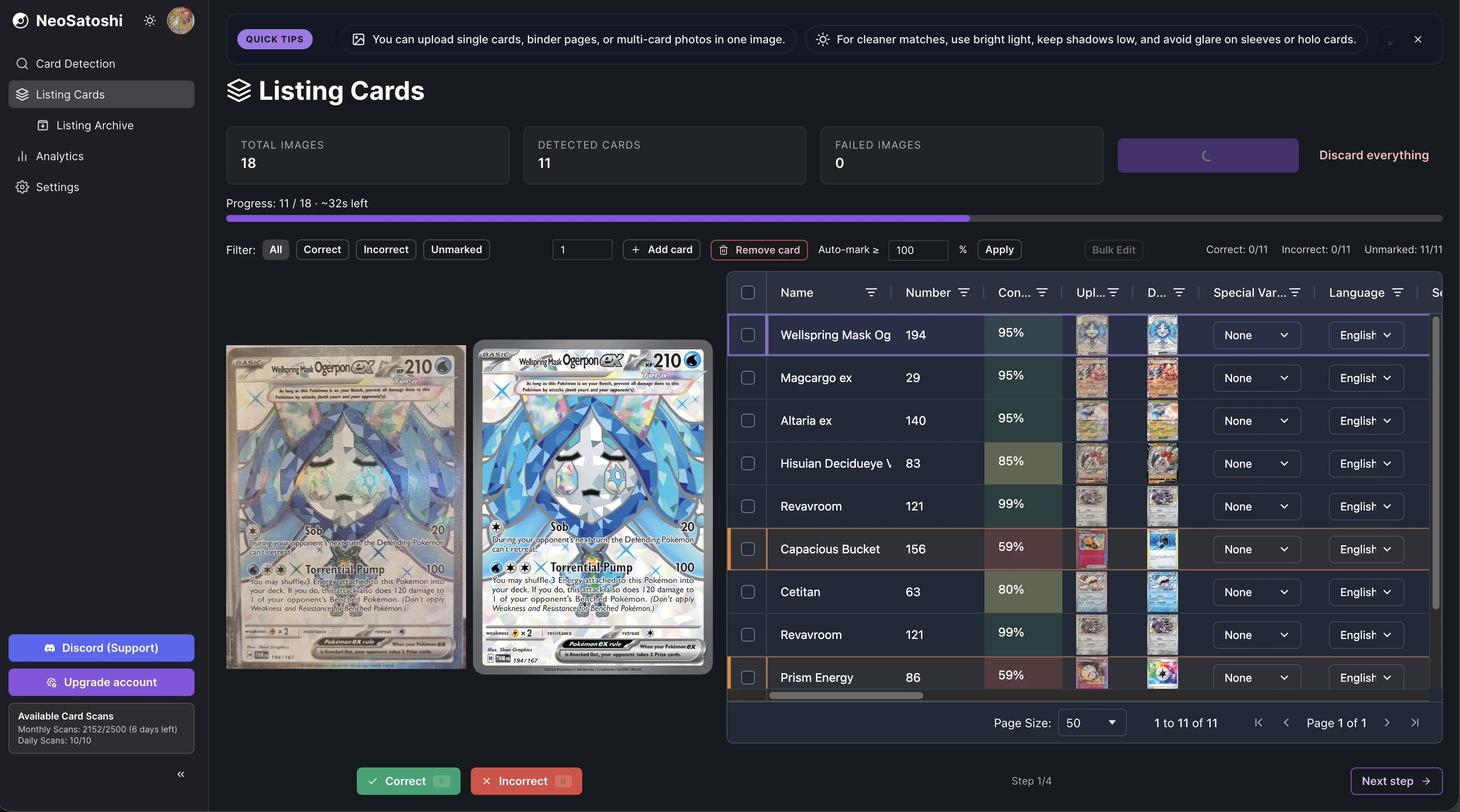
Review every match in one table
Each detected card appears with its name, set code, printed number, finish, language and prices. Fix a wrong match by picking another printing or by searching for the card.
List directly or export a file
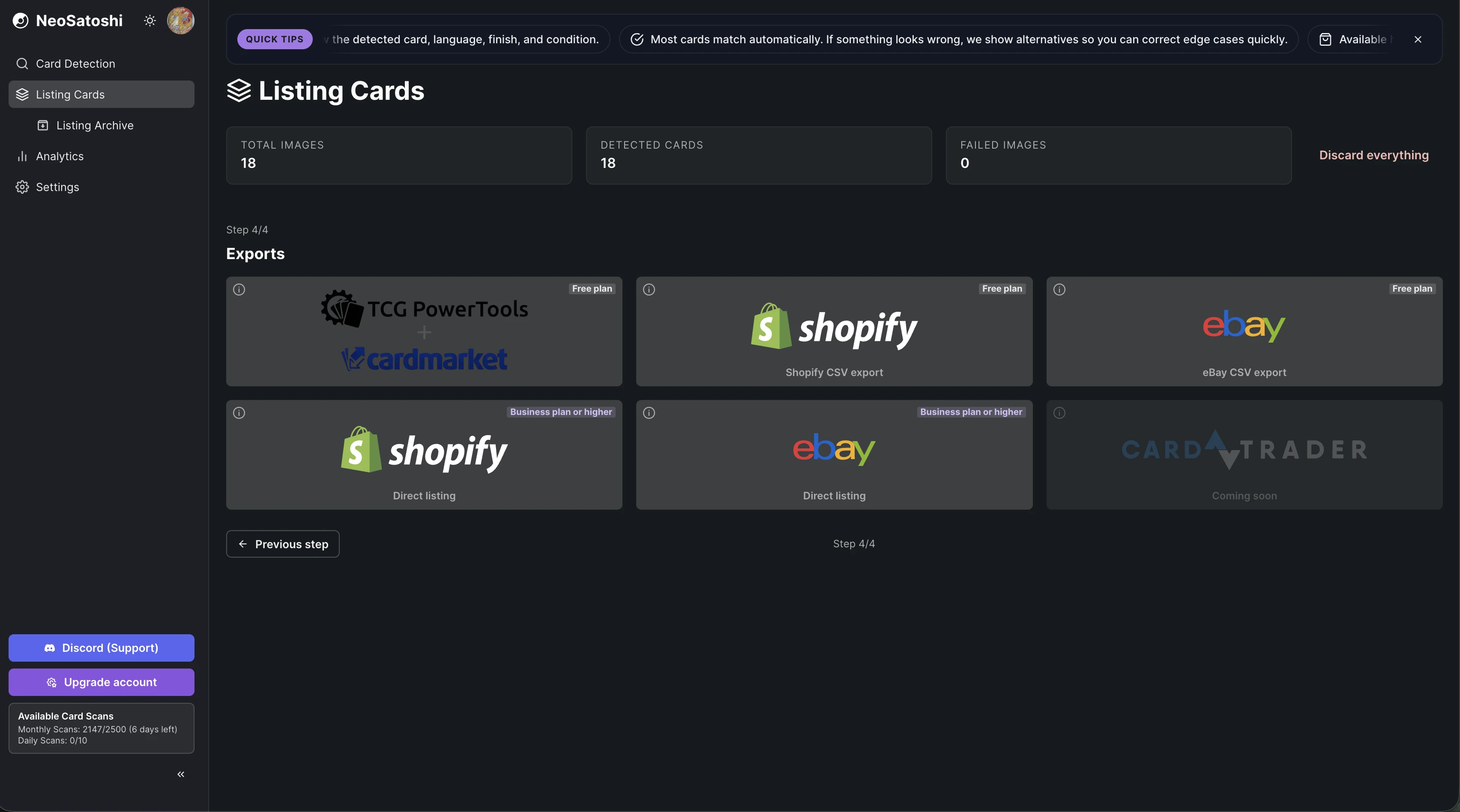
Publish to eBay or Shopify, or download the eBay, Shopify, TCGPowerTools or custom export file.
How it works
Choose Cyberpunk TCG
In step 1 of Listing Cards, pick Cyberpunk TCG with the card game switch. A batch is always one game.
Upload photos or scans
Upload photos or scans, or use the watched scan folder. One photo can hold several cards, such as a binder page or cards laid out on a table, best with up to about 20 cards per photo. The watched scan folder expects one card per scanned sheet.
Pick printings and set condition
Where the photo does not prove it, pick Beta or Retail in step 2. Then set the condition. Every card starts as Near Mint (NM).
Set your prices
Start from Cardmarket or TCGplayer prices and add a markup per price range, a minimum price and rounding. Type the price of a card that has none yourself.
List or export
Publish to eBay or Shopify directly (Business plan or higher) or download the eBay, Shopify, TCGPowerTools or custom export on any plan.
Good to know before you start
You set the condition
NeoSatoshi identifies the card, it does not grade it. Every card starts as Near Mint (NM), and you change the condition per card or in bulk edit. On a graded slab we read the grade off the label, we never estimate condition.
English and French only
Cyberpunk TCG is printed in English and French, and those are the two languages NeoSatoshi recognises and prices. Beta cards and some promos exist in English only.
Several cards per photo
One photo can hold several Cyberpunk TCG cards, best with up to about 20 per photo. Cards that are too small on the photo are not read, and front and back pairs still need one card per photo.
You pick what the photo cannot prove
When the photo does not show which printing it is, the row waits for your pick and has no price until then. It cannot be exported before.
No TCGplayer price for French cards
TCGplayer sells English cards only. French cards are priced from Cardmarket, and where a printing has no price, you type it.
Not the Alpha Kit
The Alpha Kit is not recognised. Every other Cyberpunk TCG product is, from Welcome to Night City and its Beta to the promos and prize cards.
Common questions
- Which Cyberpunk TCG cards does NeoSatoshi recognise?
- English and French cards of all 17 sets and products: Welcome to Night City and its Beta, The Heist and Embracing Power starter decks and their Betas, Box Toppers, Pre-Release, Set 1 Promos, the two demo decks, Judge Promos, Night City Brawl, Night City Showdown and Edgerunner Open. The Alpha Kit is not supported.
- How does NeoSatoshi tell Beta and Retail apart?
- By the β before the number on the corner tag and the set line on the card's edge, because the art is the same. When the photo does not show them clearly, you pick the printing, and every option shows its image, set code, number and price, the Retail one first.
- Why does a card have no price?
- Because its printing is not known yet, and a Beta card can cost very differently from its Retail print. Pick it in step 2 and the price of that printing appears. Some new promos, demo deck cards and Beta prints have no market price at all; type it yourself. NeoSatoshi never fills in a minimum price or another printing's price.
- Which prices do French Cyberpunk TCG cards get?
- The Cardmarket price of their product, because Cardmarket sells a Cyberpunk TCG card in every language as one product. TCGplayer has English cards only, so French cards get no TCGplayer price.
- Can I list graded Cyberpunk TCG cards?
- Yes. On PSA, BGS and CGC slabs the grading company, the grade and the cert number are read from the label. We read the grade off the label, we never estimate condition. Slabs of other grading companies you enter by hand.
- Where can I sell Cyberpunk TCG cards with NeoSatoshi?
- On eBay (Direct Listing or the eBay CSV), on Shopify (Direct Listing or the Shopify CSV) and on Cardmarket through the TCGPowerTools CSV. A custom CSV or JSON export is available for other tools, and developers can use the Detection API.
- Does NeoSatoshi grade the condition of my cards?
- No. Detection identifies the card, not its condition. Every card starts as Near Mint (NM), and you set the condition yourself before listing.
- Can I photograph several Cyberpunk TCG cards at once?
- Yes. Binder pages and cards laid out on a table work, best with up to about 20 cards per photo. Each card becomes its own row, and a card that was only guessed is marked for review. With a document scanner, scan one card per sheet: any scanner that saves JPEG or PNG files into a folder works, and in desktop Chrome, Edge, Brave or Opera the watched scan folder adds new scans automatically and pairs fronts and backs.
- Do I need a paid plan?
- No. Everyone gets 10 free card scans per day, and the Free plan includes monthly card scans and every export file. eBay and Shopify Direct Listing and the daily price sync need the Business plan or higher.
- What does a Cyberpunk TCG listing title look like?
- "Cyberpunk TCG", the name, the set code, the printed number and the rarity, then "French" for a French card, for example "Cyberpunk TCG V: Streetkid WNCB B005a Rare". The set code and the number are never cut, because they tell Beta and Retail apart. The set name goes into the set item specific.
Don't see your question?
Browse all answers
More for Cyberpunk TCG sellers
Cardmarket listing workflow
How the TCGPowerTools CSV turns a reviewed batch into Cardmarket listings.
Read more
Detection API for developers
The same card recognition for your own software. Send cards with "tcg": "cyberpunk".
Read more
Graded slabs in every game
How PSA, BGS and CGC labels are read and how a slab is priced and listed.
Read more
Daily price sync for Shopify and eBay
How your listings follow Cardmarket or TCGplayer every day, and what the sync leaves alone.
Read more
Card recognition API for other games
One request per photo for One Piece, Lorcana, Yu-Gi-Oh!, Magic, Star Wars: Unlimited, Digimon and Cyberpunk TCG.
Read more
Ready to list your Cyberpunk TCG cards?
Start with 10 free card scans per day and see your first batch detected, priced and ready to list.