List Pokémon cards on Shopify without manual product creation
NeoSatoshi turns your card photos into Shopify products. Connect your store, push detected cards as products with images, prices, and variants in one click.
Selling through Shopify? Install NeoSatoshi ‑ TCG Card Scanner and Shopify handles the billing, from $39 per month. The web app is the route for eBay and Cardmarket and is billed separately, so you only need one of the two.
See it happen

Demo Cards Store
Products
A card added by hand means title, set, number, rarity, condition, language and price. Then the next card.
No products yet
Around two minutes per card by hand, and the details are easy to get wrong.
A simulation of the workflow, shown on our own site. Card data and prices are examples.
Everything you need for Shopify product creation
Direct Shopify product sync
Connect your Shopify store in Settings and push detected cards as products. Title, description, images, price, and SKU all set automatically.
Per-card images and pricing
Your real card photos become the Shopify product image. Pricing pulls from Cardmarket data and live eBay price comparisons with markup rules.
Shopify CSV export option
Prefer CSV? Generate a Shopify-ready product CSV for bulk import, with all required fields and image URLs filled in.
Set, number, and finish as metadata
Card-specific attributes flow into product fields and tags so your store stays searchable and filter-friendly for buyers.
Best fit for this workflow
Fit 1
Shopify is your storefront
Use this page if you run a Shopify store and want detected cards to flow directly into product listings instead of marketplace drafts.
Fit 2
You want direct product sync, not CSV imports
This page fits sellers who prefer pushing products straight to Shopify via API, with images and pricing already attached.
Fit 3
You sell singles and want clean per-card products
Choose this page when each card should be its own product with the right photo, set, number, condition, and price.
Map detected cards to Shopify products
Review which detected cards become Shopify products, configure pricing rules, and choose which images and metadata fields are used.
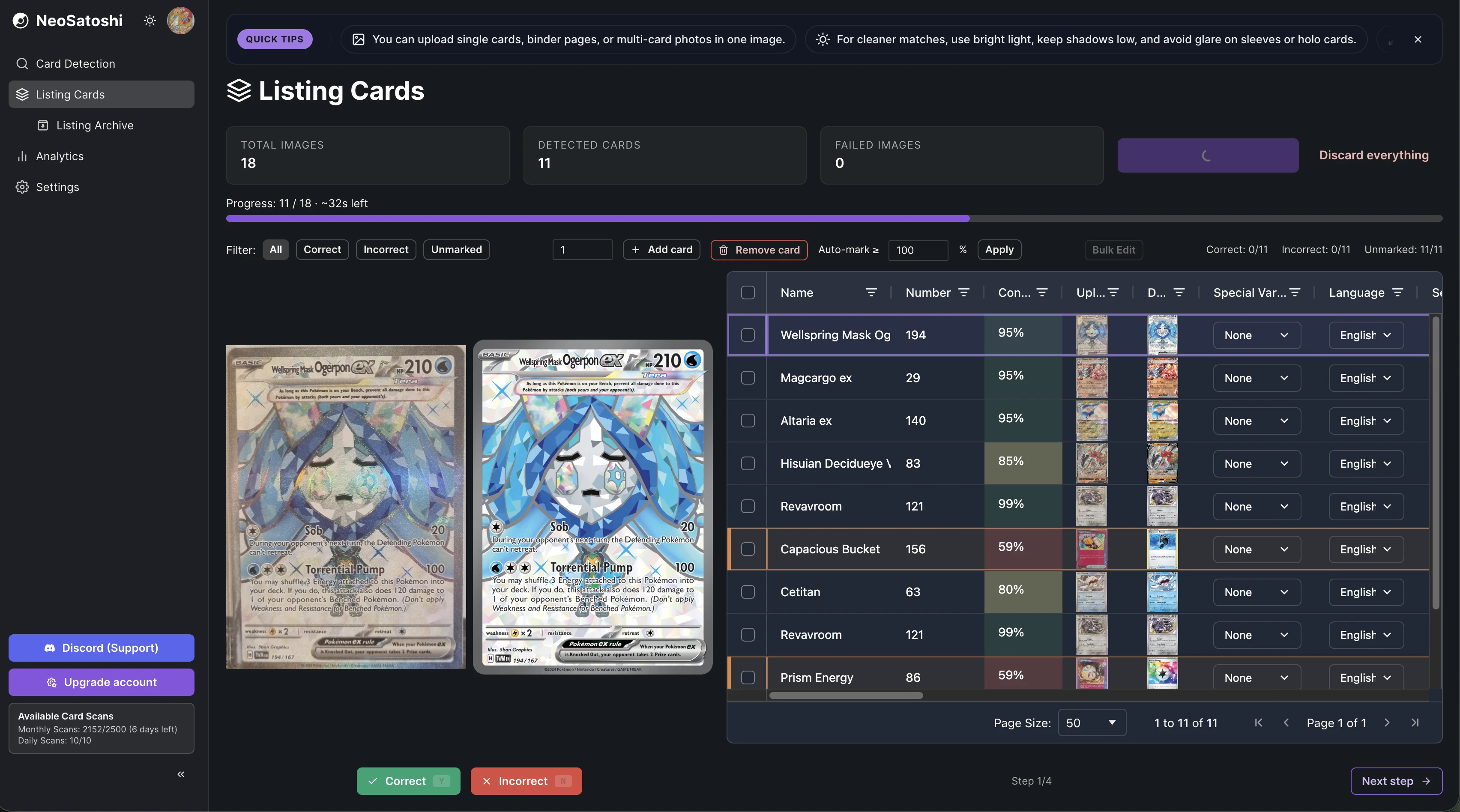
One workflow for many marketplaces
Shopify sits alongside eBay and Cardmarket export options in the same listing flow. Pick where each batch goes without leaving the workflow.
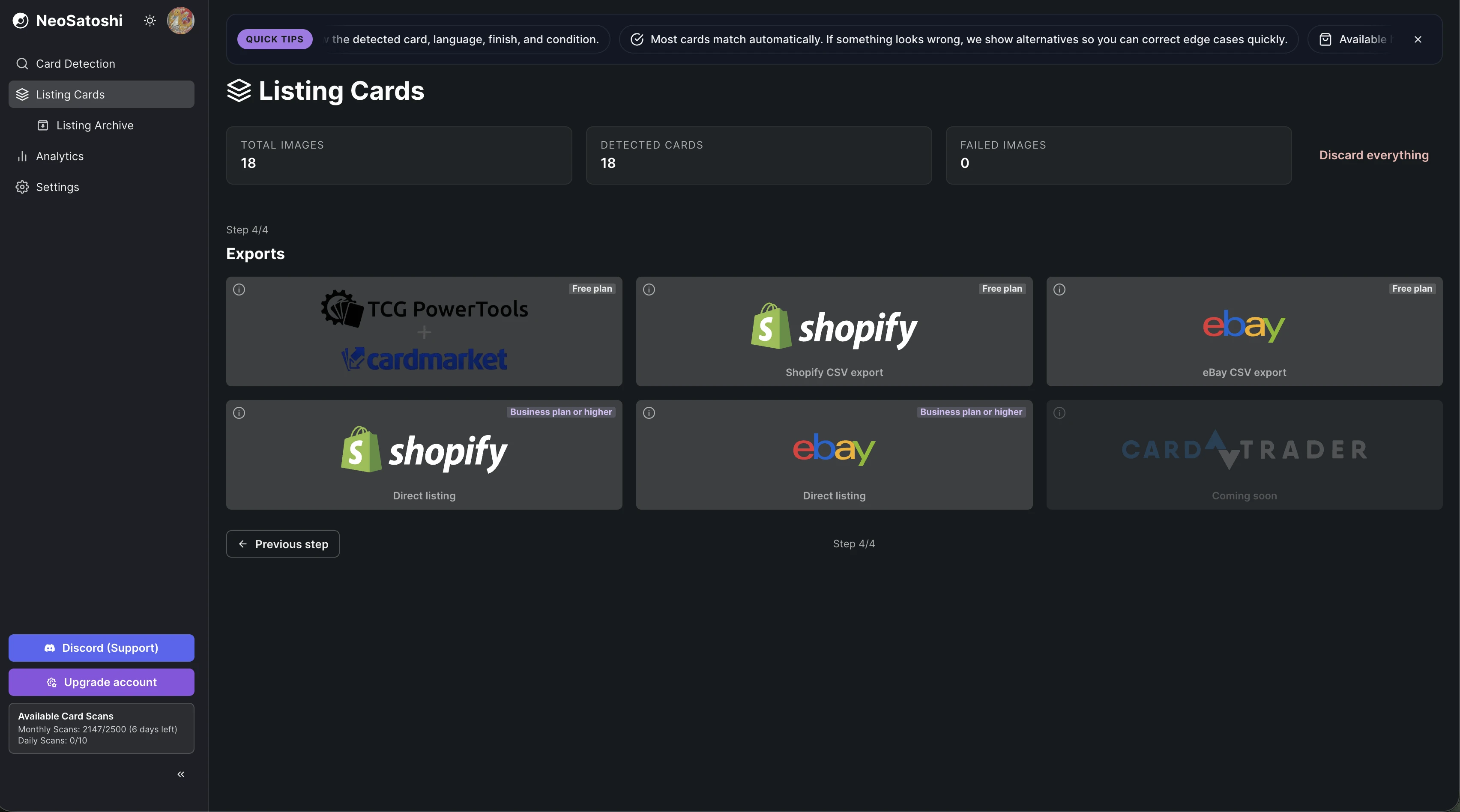
Photo to Shopify product in 3 steps
Upload and detect
Upload your card photos. NeoSatoshi identifies each card and fills in all the details: name, set, number, rarity, finish.
Price and configure
Set prices using Cardmarket data and live eBay price comparisons. Choose how each card maps to a Shopify product, including image source and tags.
Publish to Shopify
Push directly via the Shopify API or download a Shopify-ready CSV. Products go live with images, pricing, and metadata in place.
Shopify listing questions
- Do I need a paid Shopify plan?
- No. You do not need any extra Shopify plan, and connecting NeoSatoshi costs nothing extra on Shopify. Install the NeoSatoshi app from the Shopify App Store and pay your plan through Shopify, or connect your store to your NeoSatoshi account on the Business plan or higher. The Shopify CSV export works on every plan.
- Does it create variants or separate products per card?
- By default each card becomes its own product. You can choose product type, tags, and how condition maps to your store structure.
- Can I use my own product images?
- Yes. Your real card photo is used as the product image. You can also choose to use stock images for specific cards if you prefer.
- Does it support multiple stores?
- Yes. You can connect a Shopify store in NeoSatoshi Settings and reconnect or switch stores when needed.
Don't see your question?
Browse all answers
Explore related seller workflows
Related use case
See the full bulk listing workflow, from photo upload and card matching to pricing and marketplace export.
Learn more
Related use case
Focus on the eBay-specific workflow, including direct listing, CSV drafts, templates, and marketplace settings.
Learn more
Related use case
Use the Cardmarket workflow via TCGPowerTools for European Pokémon card sellers who price by Cardmarket trends.
Learn more
Related use case
Start with AI card detection and review flow if your main need is fast card identification from photos.
Learn more
Related use case
Track revenue, orders, platform mix, and multi-currency performance after your cards are listed and sold.
Learn more
List Pokémon cards on Shopify without manual product creation
NeoSatoshi turns your card photos into Shopify products. Connect your store, push detected cards as products with images, prices, and variants in one click.