Scan your Pokémon cards, get listing-ready data instantly
Upload a photo of one card or an entire binder page. NeoSatoshi's AI identifies each card and gives you the data you need to list and sell.
Not just a card identifier, a seller tool
Multi-card scanning
Photograph an entire binder page and NeoSatoshi detects every card in the image. No need to scan cards one at a time.
Seller-focused output
Get card name, set, number, rarity, finish (normal or reverse holo), special variants, and market prices. Not just a Pokédex entry.
Review and correct
If the AI suggests the wrong match for an edge case, you see alternatives and can correct with one click before exporting.
Straight to listing
Detection results flow directly into the listing workflow. No copy-pasting between apps. Scan, review, price, export.
Best fit for this workflow
Fit 1
You start with raw photos and unknown cards
Use this page if your first step is figuring out what is in a binder page, lot, or batch of singles before you decide how to list them.
Fit 2
You need fast review and correction
This page fits workflows where detection quality and quick edge-case correction matter more than marketplace publishing settings.
Fit 3
You want seller-grade output, not collector trivia
Choose this page when you need set, number, finish, rarity, and market context that can feed a sales workflow, not just a card name.
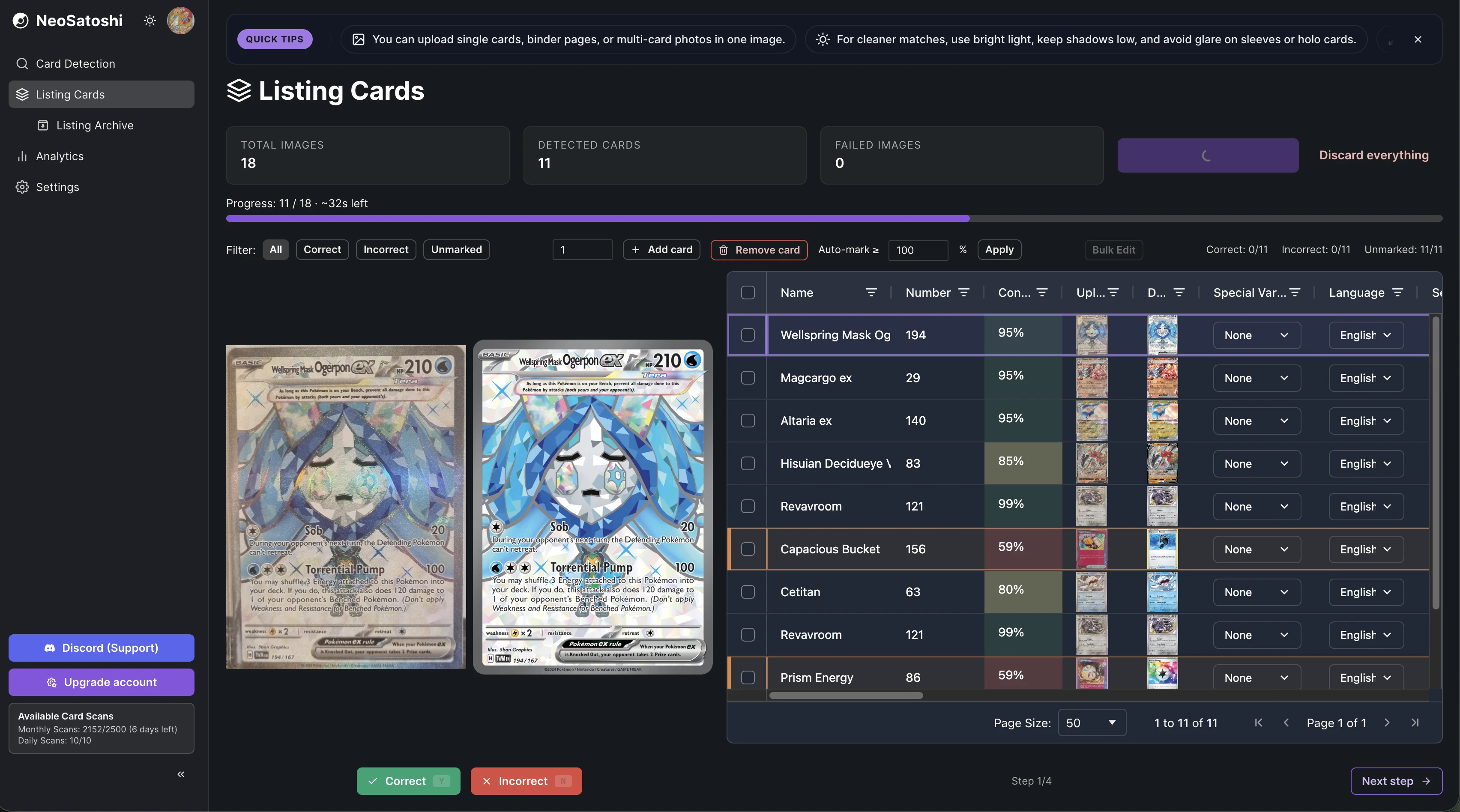
AI matches every card in the image
Upload a binder page and see each card identified with name, set, number, confidence score, and market prices in a sortable table.
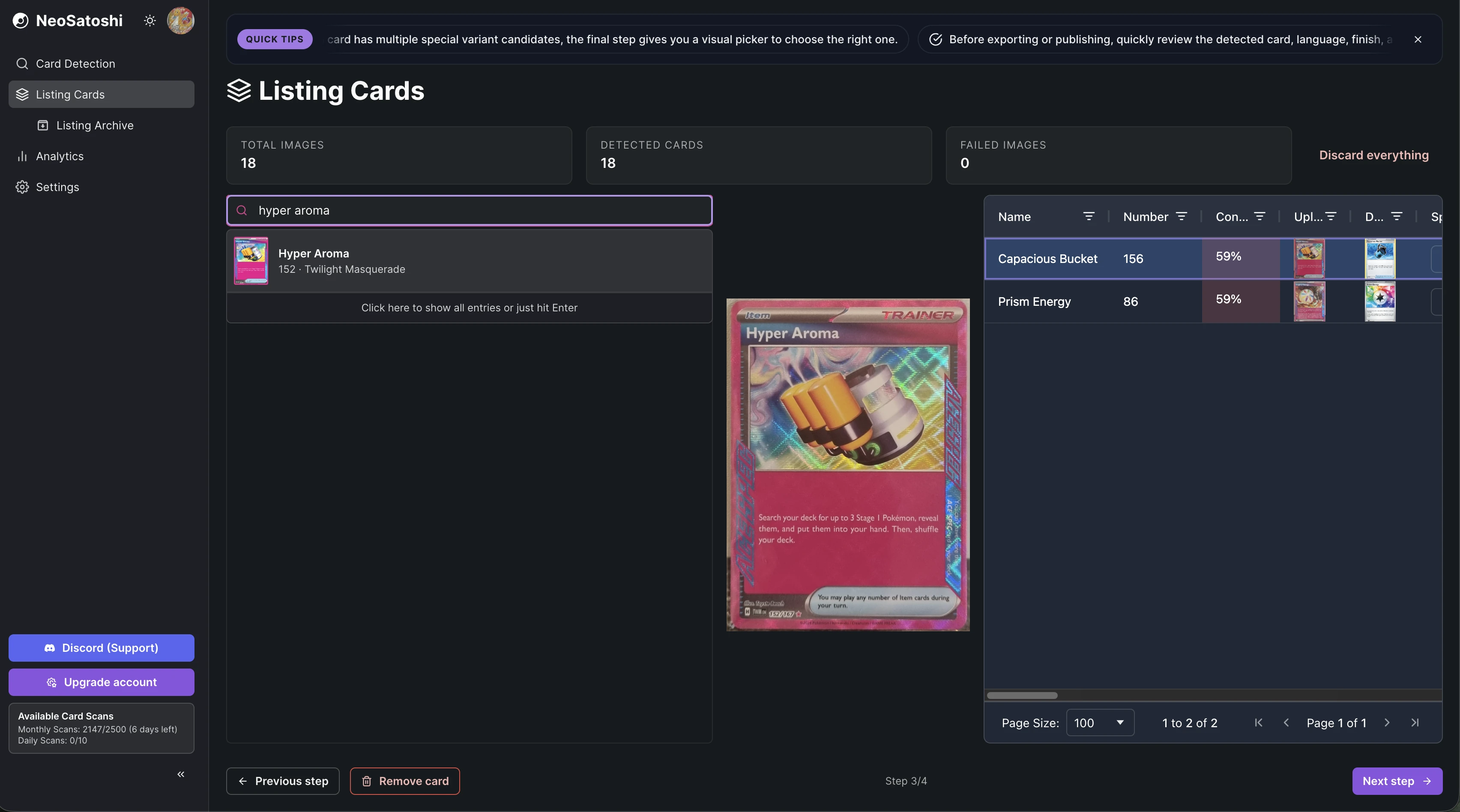
Search and correct with one click
If a card needs correction, search by name and pick the right match. The card preview updates instantly so you can verify before moving on.
From photo to identified cards
Take a photo
Use your phone or camera to photograph individual cards or full binder pages. Good lighting helps, avoid glare and reflections.
AI detection
NeoSatoshi analyzes the image and matches each card against the database. You get set, number, rarity, finish, and market prices.
Review matches
Confirm the matches or pick from alternatives. Once confirmed, your cards are ready for pricing and export.
Scanner questions
- Which languages does the scanner support?
- NeoSatoshi recognizes English, German, French, Italian, Spanish, Japanese, and Korean Pokémon cards, and shows each card in its own language with the matching artwork.
- Can I scan reverse holo or special variant cards?
- Yes. The scanner detects normal and reverse holo finishes, plus special variants like Full Art, Alt Art, and others where data is available.
- How many cards can I scan per photo?
- A standard 9-card binder page works well. You can also scan individual cards. The system handles multiple cards per image automatically.
- Is the scanner free?
- Yes, you get free daily card scans. Paid plans include significantly more monthly scans for high-volume sellers.
Don't see your question?
Browse all answers
Explore related seller workflows
Related use case
See the full bulk listing workflow, from photo upload and card matching to pricing and marketplace export.
Learn more
Related use case
Focus on the eBay-specific workflow, including direct listing, CSV drafts, templates, and marketplace settings.
Learn more
Related use case
See the Shopify-specific workflow with direct product sync, image handling, and per-card variant pricing.
Learn more
Related use case
Use the Cardmarket workflow via TCGPowerTools for European Pokémon card sellers who price by Cardmarket trends.
Learn more
Related use case
Track revenue, orders, platform mix, and multi-currency performance after your cards are listed and sold.
Learn more
Developers
Developers can call the same recognition engine directly: photo in, structured card JSON out. Test it with a free public demo key.
Learn more
Scan your Pokémon cards, get listing-ready data instantly
Upload a photo of one card or an entire binder page. NeoSatoshi's AI identifies each card and gives you the data you need to list and sell.