List One Piece cards on eBay without the grind
NeoSatoshi creates eBay-ready listings from your One Piece card photos. Detect, price, and publish directly to your eBay seller account or as a Seller Hub CSV import.
Everything you need for One Piece eBay listings
Direct eBay API listing
Connect your eBay account in Settings and publish listings directly. NeoSatoshi sets SKU, title, condition, price, images, and item specifics automatically, including the One Piece Card Game game aspect and Bandai as manufacturer.
eBay Seller Hub CSV export
Prefer CSV? Export eBay draft files that import directly into Seller Hub. All fields are pre-filled including category, condition descriptors, business policies, and Germany-ready compliance notes.
Multi-marketplace eBay support
List on eBay US, DE, GB, FR, IT, ES, NL, PL, AU, CA, and more. Each marketplace gets localized titles, item specifics, and language-correct condition labels.
Game-aware title and description templates
Customize listing titles and descriptions with templates. Variables like card name, set, number, and condition are game-aware, so One Piece cards get One Piece titles and the correct game and manufacturer, never Pokémon defaults.
Best fit for this workflow
Fit 1
eBay is your main sales channel
Use this page if you primarily sell One Piece cards on eBay and need titles, item specifics, category settings, and marketplace-specific output handled correctly.
Fit 2
You care about direct publish or Seller Hub CSV
This page fits sellers deciding between direct API listing and eBay CSV drafts, with both paths explained in one eBay-focused workflow.
Fit 3
Templates and policies matter to your process
Choose this page when shipping policies, return settings, title templates, GPSR/compliance messages, and localized eBay details are part of your listing workflow.
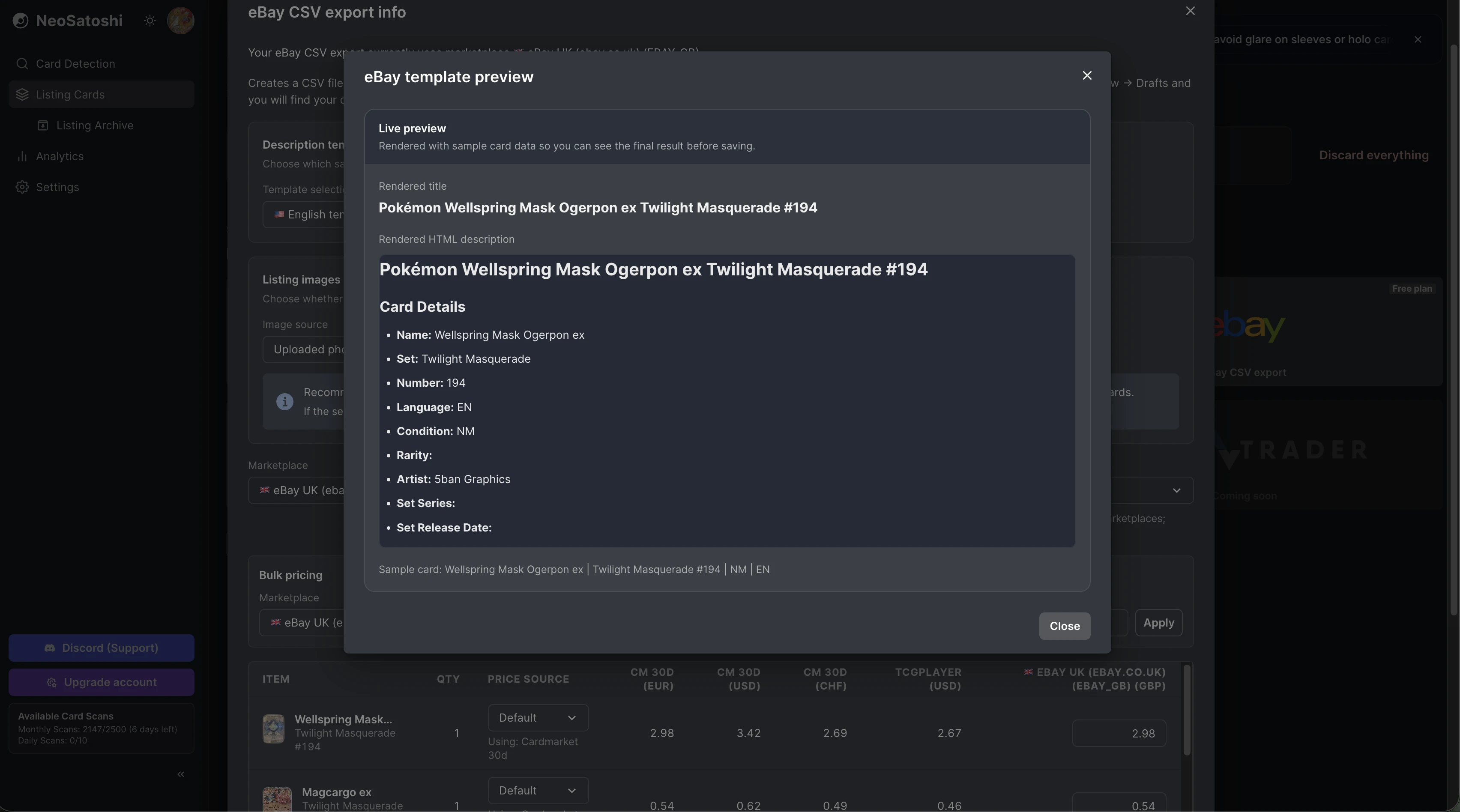
Preview your eBay listing
See exactly how your eBay title and HTML description will look before publishing. Variables like card name, set, number, condition, and language get filled in automatically.
Configure your eBay CSV export
Choose your eBay marketplace, image source preferences, pricing rules, and business policies. See Cardmarket data plus live eBay prices from competing listings, with everything pre-filled for a ready-to-import, Germany-compliant CSV.
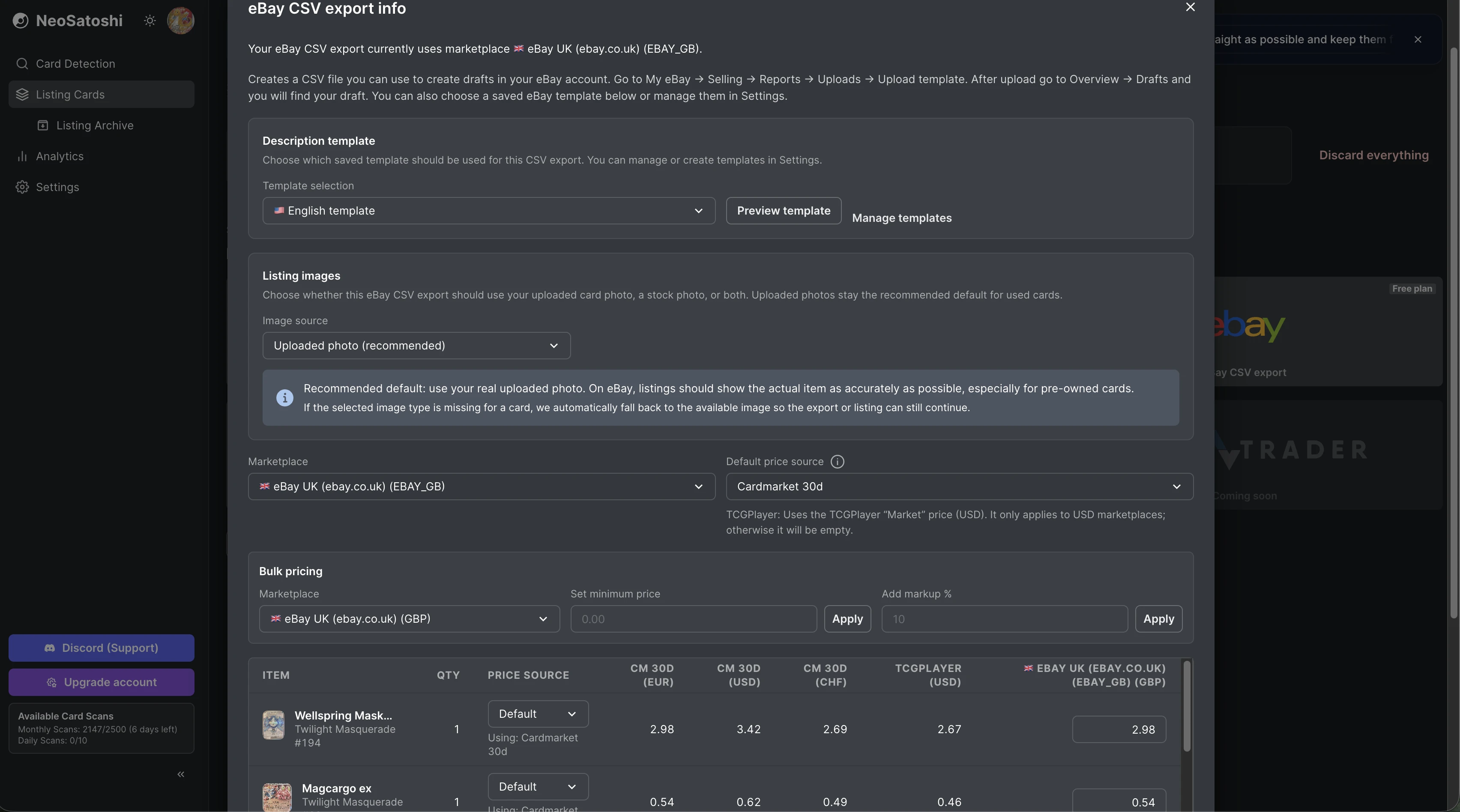
Photo to eBay listing in 3 steps
Upload and detect
Upload your One Piece card photos. NeoSatoshi identifies each card and fills in the details: name, set, number, color, type, and rarity.
Price and configure
Set prices using Cardmarket data and live eBay prices from other active listings. Choose your eBay marketplace, apply title templates, and configure shipping/payment/return policies.
Export or publish
Hit export for a Seller Hub CSV, or publish directly via the eBay API. Your listings go live with all item specifics, images, and policies pre-set.
eBay listing questions
- Do I need to connect my eBay account?
- Only for direct API listing. For CSV export, you just download the file and import it into eBay Seller Hub. No account connection needed.
- Which eBay marketplaces are supported?
- US, DE, GB, FR, IT, ES, NL, PL, AU, CA, AT, BE, CH, and IE. Each marketplace gets correctly localized item specifics and condition labels.
- Does it set eBay item specifics automatically?
- Yes. Game (One Piece Card Game), card name, manufacturer (Bandai), language, card condition, illustrator, and year manufactured are set automatically from the detected card data. For Germany, you can also output compliance/GPSR notes and legally clean template blocks consistently.
- Can I use my own eBay listing templates?
- Yes. You can create custom title and description templates with variables like card name, set name, number, condition, and more. They are game-aware, so One Piece cards render correctly.
Don't see your question?
Browse all answers
Guides for One Piece sellers
Where to sell One Piece cards: Cardmarket, eBay or Shopify
Which channel suits which cards and buyers, and how to use more than one without entering every card twice.
Read the answer
English vs Japanese One Piece cards for sellers
Why the two languages are separate products with separate prices, and how to list and price each copy.
Read the answer
How to list parallel and alternate art cards
How to tell the versions apart, list each one on its own product and price it from its own market.
Read the answer
Explore related seller workflows
Related use case
See the full One Piece bulk listing workflow, from photo upload and card matching to pricing and marketplace export.
Learn more
Related use case
Start with AI detection for One Piece cards if your main need is fast identification of set, number, color, and type from photos.
Learn more
List One Piece cards on eBay without the grind
NeoSatoshi creates eBay-ready listings from your One Piece card photos. Detect, price, and publish directly to your eBay seller account or as a Seller Hub CSV import.