See all your Pokémon card sales in one place
Track revenue, orders, and trends across eBay, Shopify, and Cardmarket. Multi-currency support, clean charts, and no spreadsheet headaches.
Your selling data, finally organized
Multi-platform overview
See eBay, Shopify, Cardmarket, and CardTrader sales side by side. Compare platforms, spot trends, and understand where your revenue comes from.
Multi-currency support
Selling in EUR, USD, CHF, and GBP? The analytics dashboard handles multiple currencies and lets you compare across all of them.
Revenue and order charts
Visual charts show your revenue over time, order counts, and average order value. Filter by platform, date range, and currency.
Data import made easy
Import your sales data from marketplace exports or connect your accounts directly. Upload CSV files or sync automatically and see your numbers instantly.
Best fit for this workflow
Fit 1
You sell on multiple platforms
Use this page if your main problem is fragmented revenue data across eBay, Shopify, Cardmarket, or CardTrader rather than the listing workflow itself.
Fit 2
You want trends, KPIs, and platform comparison
This page fits sellers who want to understand performance over time, compare channels, and see where revenue and profit actually come from.
Fit 3
CSV imports and data consolidation matter to you
Choose this page when bringing exports together, normalizing currencies, and replacing spreadsheets is the real value you are looking for.
Your complete sales overview
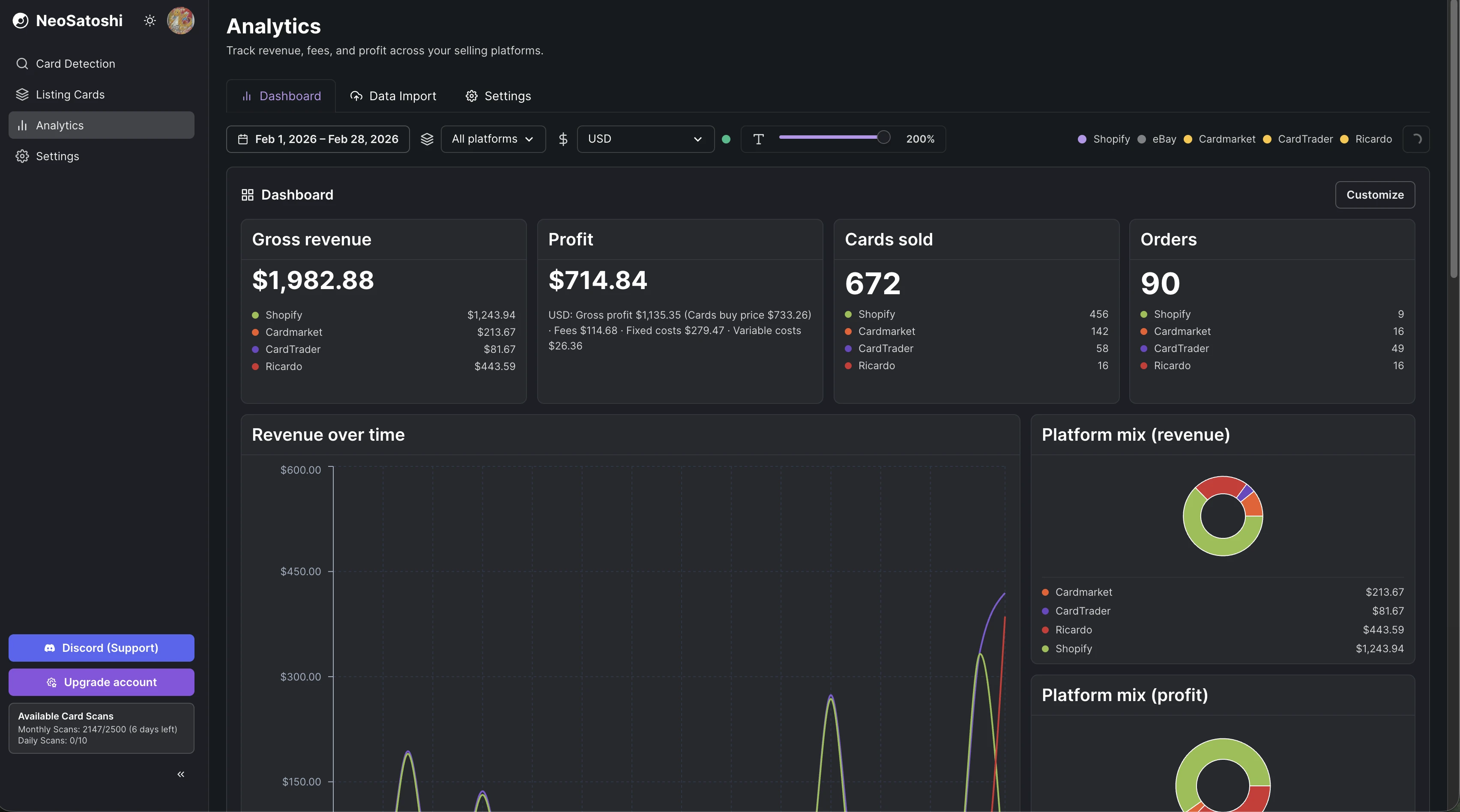
Gross revenue, profit, cards sold, and orders at a glance. Filter by platform, currency, and date range. Platform mix charts show where your revenue comes from.
Detailed KPIs and revenue trends
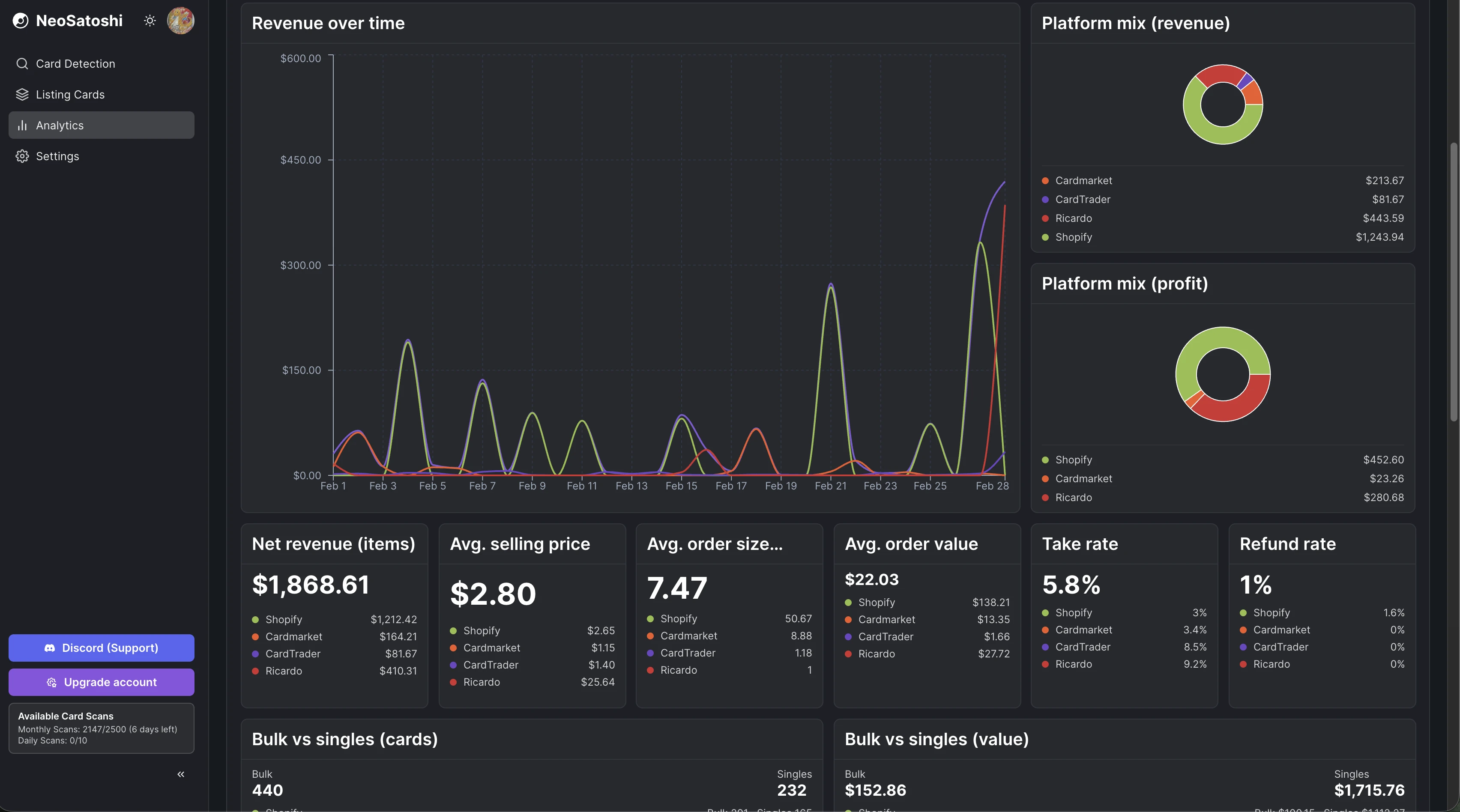
Track net revenue, average selling price, order size, and refund rate across all platforms. The revenue chart shows daily trends over time.
Bulk vs singles and platform comparison
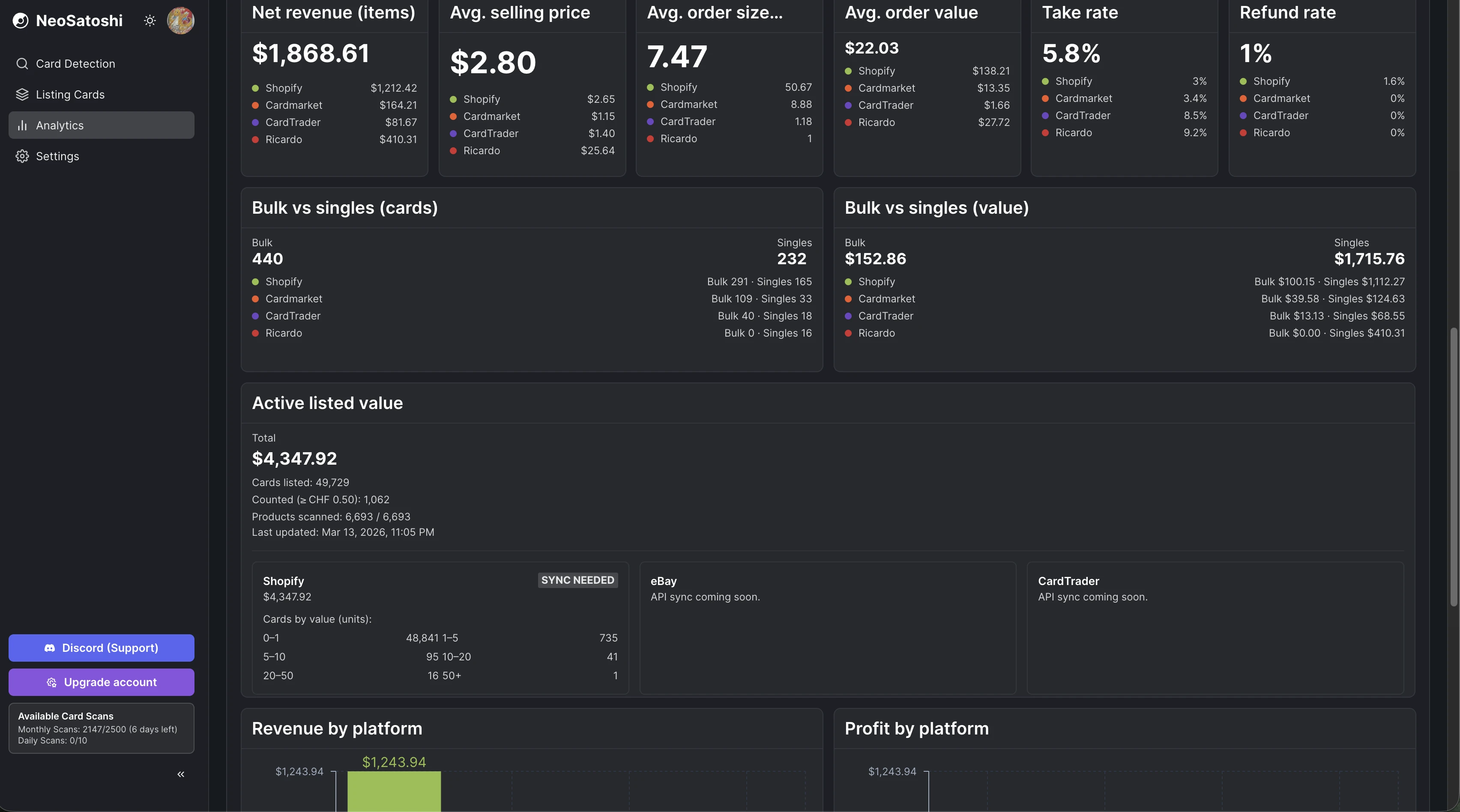
See how bulk and single sales compare by volume and value. Revenue and profit by platform charts help you understand which channels perform best.
How it works
Import your data
Upload sales export files from eBay, Shopify, or Cardmarket. The system parses and normalizes your data automatically.
Explore your dashboard
See charts, totals, and breakdowns by platform, currency, and time period. All your sales data in one clean view.
Track trends
Compare periods, spot your best-selling platforms, and understand your revenue growth over time.
Analytics questions
- Which marketplaces are supported for analytics?
- eBay, Shopify, Cardmarket, and CardTrader. You can import sales data from each platform and see everything in one dashboard.
- Do I need to connect my marketplace accounts?
- You can import sales data via CSV exports from your marketplaces, or connect your accounts directly for automatic syncing. Both options work.
- Can I track sales in different currencies?
- Yes. The dashboard supports EUR, USD, CHF, GBP, and more. You can view revenue per currency or across all currencies.
- Is the analytics dashboard free?
- The analytics dashboard is available to all users. Some advanced features may require a paid plan.
Don't see your question?
Browse all answers
Explore related seller workflows
Related use case
See the full bulk listing workflow, from photo upload and card matching to pricing and marketplace export.
Learn more
Related use case
Focus on the eBay-specific workflow, including direct listing, CSV drafts, templates, and marketplace settings.
Learn more
Related use case
See the Shopify-specific workflow with direct product sync, image handling, and per-card variant pricing.
Learn more
Related use case
Use the Cardmarket workflow via TCGPowerTools for European Pokémon card sellers who price by Cardmarket trends.
Learn more
Related use case
Start with AI card detection and review flow if your main need is fast card identification from photos.
Learn more
See all your Pokémon card sales in one place
Track revenue, orders, and trends across eBay, Shopify, and Cardmarket. Multi-currency support, clean charts, and no spreadsheet headaches.