Scan, price and list Disney Lorcana cards in one workflow
Photograph or scan your Lorcana cards. NeoSatoshi finds the set and card number, reads the language from the card, keeps foil and non-foil copies apart with their own prices, and turns the batch into eBay, Shopify or Cardmarket listings.
Built for the way Lorcana cards are sold
Card detection from photos and scans
Upload single cards, multi-card photos or binder pages. NeoSatoshi identifies each Lorcana card by set and card number and adds name, rarity, ink and type, a confidence value, alternative matches and current market prices.
Language read from the card
English, German, French and Italian Lorcana cards are supported. The language is read from the printed line at the bottom left of each card and can be changed per card in the review table.
Market prices for foil and non-foil
Daily Cardmarket prices (30-day average, trend, 7-day average, low) for the foil and the non-foil copy, plus TCGplayer prices. For eBay you can also load the median asking price of active listings on your eBay marketplace, and a foil copy is only compared with foil listings.
eBay Direct Listing and CSV
Publish straight to your eBay account or download the eBay CSV. Game and manufacturer item specifics are filled in for Disney Lorcana, and variation listings group cards of the same set into one listing where the buyer picks the card.
Shopify products
Create products directly in your Shopify store, with a dry-run preview first, or export a Shopify CSV. NeoSatoshi is also available as an app in the Shopify App Store.
Cardmarket via TCGPowerTools
The TCGPowerTools import file for Cardmarket comes with the Cardmarket product, a Cardmarket price and an isFoil column for foil copies. A custom CSV or JSON export is available as well.
Watched scan folder for document scanners
In desktop Chrome, Edge, Brave or Opera, NeoSatoshi watches the folder your scanner saves to, adds new JPEG or PNG scans automatically and pairs fronts and backs. Any document scanner that saves images into a folder works.
Built-in AI assistant
The support assistant in the dashboard answers questions with the exact button names, explains error messages where they appear and can prepare changes, such as setting many rows to foil, that only apply when you click to confirm them.
Foil and non-foil, handled card by card
Every Lorcana card has a Foil column (Yes or No) right after the card name, also available in bulk edit.
Changing it switches the Cardmarket prices and the listing price to the foil or non-foil price, so check your price after choosing the finish.
Printings that only exist as foil, such as Enchanted, Epic, Iconic and most promos, are fixed to foil. Printings that only exist as non-foil are fixed to non-foil.
When the foil finish is recognised on the photo, the cell tells you so. You can always change it.
On eBay a foil copy is always listed separately: Foil is added after the card name in the title, the Finish item specific says Foil, and variation listings put foil copies into their own grouped listing.
On Shopify a foil copy is its own Foil variant, and the TCGPowerTools CSV marks it in the isFoil column.
Best fit for this workflow
Fit 1
You list Lorcana singles in volume
Typing set, number, language and finish for every card is the slow part. Detection fills them in for a whole batch of up to 400 cards.
Fit 2
You sell foil and non-foil copies
Foil and non-foil copies of the same card need their own price and their own listing. NeoSatoshi keeps them apart from detection to export.
Fit 3
You sell on more than one marketplace
One reviewed batch can go to eBay, Shopify and Cardmarket, so you never enter the same cards three times.
Review every match in one table
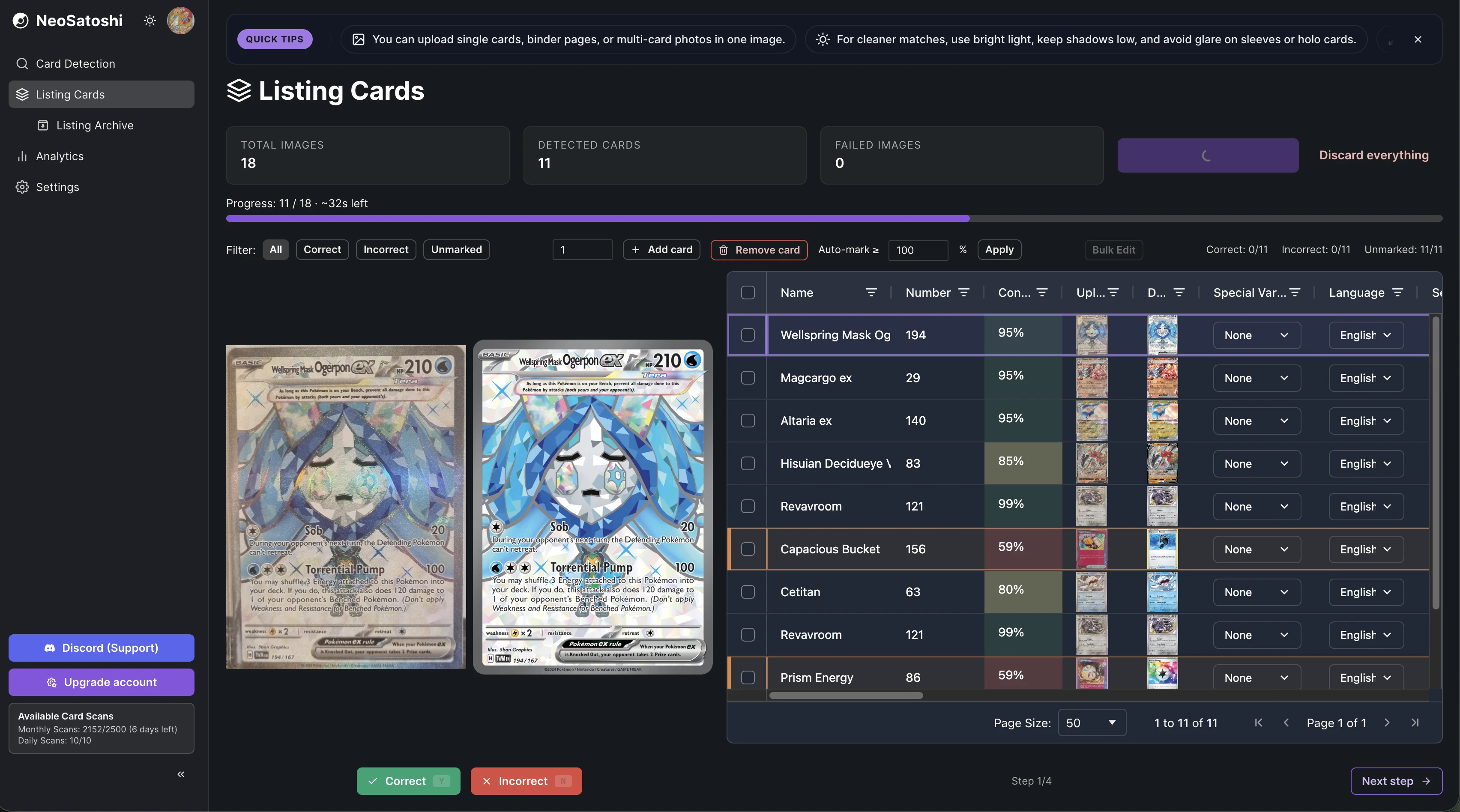
Each detected card appears with set, number, language and prices. Fix a wrong match by picking an alternative or searching manually.
List directly or export a file
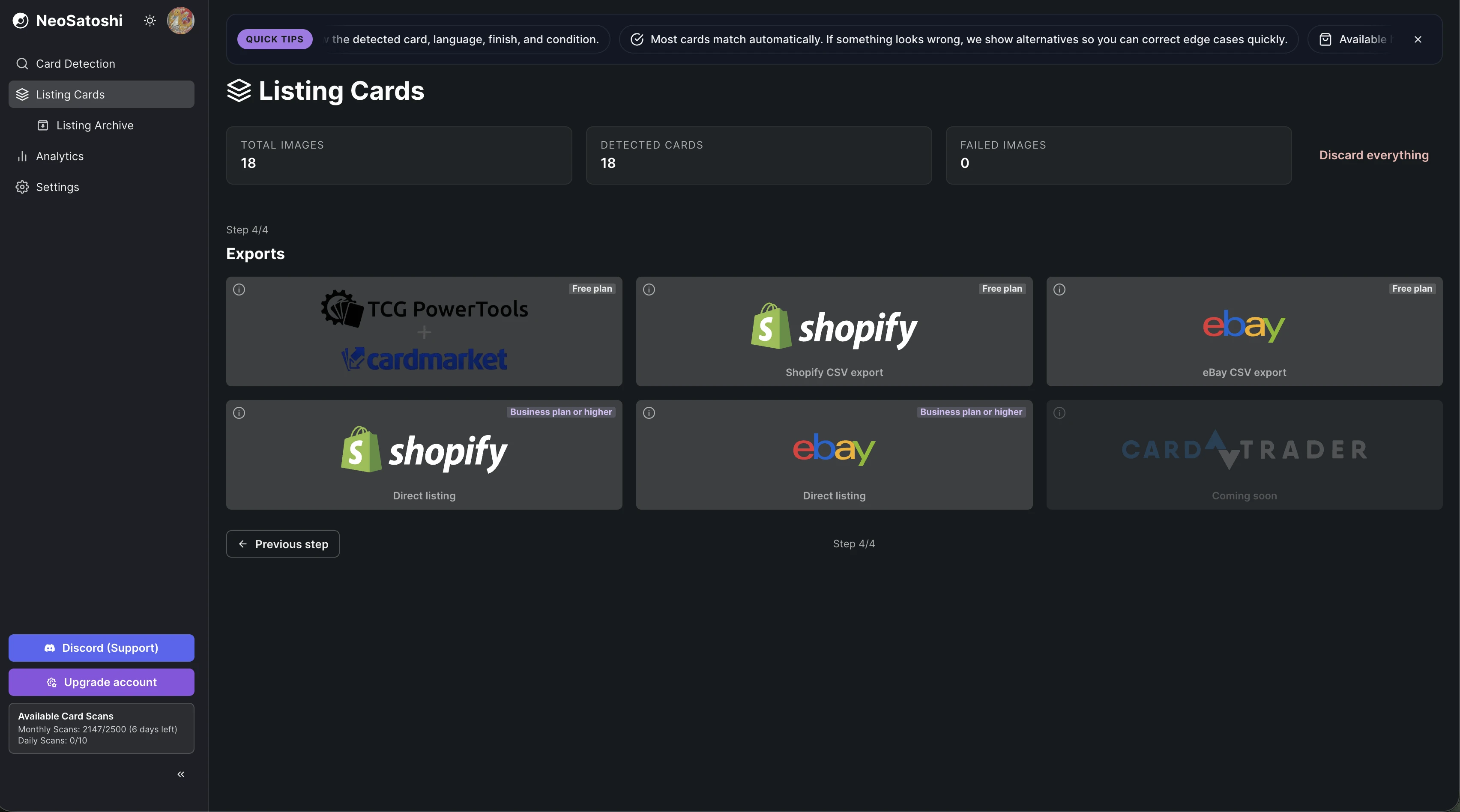
Publish to eBay or Shopify, or download the eBay, Shopify, TCGPowerTools or custom export file.
How it works
Choose Disney Lorcana
In step 1 of Listing Cards, pick Lorcana with the card game switch. A batch is always one game.
Upload photos or scans
Drop single cards, multi-card photos or binder pages, or use the watched scan folder. Best results with up to about 20 cards per photo in good, even light.
Review matches, foil and condition
Check each match, pick an alternative where needed, set Foil to Yes or No and set the condition. Every card starts as Near Mint (NM).
Set your prices
Start from Cardmarket, TCGplayer or eBay prices and add a markup per price range, a minimum price and rounding.
List or export
Publish to eBay or Shopify directly (Business plan or higher) or download the eBay, Shopify, TCGPowerTools or custom export on any plan.
Good to know before you start
You set the condition
NeoSatoshi identifies the card, it does not grade it. Every card starts as Near Mint (NM), and you change the condition per card or in bulk edit.
Four card languages
English, German, French and Italian Lorcana cards are supported. Other Lorcana languages, such as Japanese or Chinese, are not.
Foil copies keep their own price
The daily price sync reprices Lorcana foil copies on eBay and Shopify from the foil price of your price source only. Where that source has no foil price, the foil copy keeps its current price.
Direct listing needs the Business plan
eBay and Shopify Direct Listing and the daily price sync need the Business plan or higher. All export files work on every plan, including Free.
Common questions
- Which Disney Lorcana languages does NeoSatoshi recognise?
- English, German, French and Italian. The language is read from the printed line at the bottom left of each card (for example EN) and can be changed per card. Japanese, Chinese and other Lorcana languages are not supported.
- Does NeoSatoshi know if a Lorcana card is foil?
- Every Lorcana card has a Foil field (Yes or No) that you set per card or in bulk edit. Printings that only exist as foil, such as Enchanted, Epic and Iconic cards, are fixed to foil. When the foil finish is recognised on the photo, the table shows it, and you can always change it.
- How are Lorcana foil copies priced and listed?
- A foil copy uses the Cardmarket foil prices, and the listing price switches with the finish, so set your own price after choosing it. On eBay a foil copy gets its own listing with Foil in the title and in the Finish item specific, on Shopify it is a separate Foil variant, and the TCGPowerTools CSV marks it with isFoil.
- Where can I sell Lorcana cards with NeoSatoshi?
- On eBay (Direct Listing, including variation listings, or the eBay CSV), on Shopify (Direct Listing or the Shopify CSV) and on Cardmarket through the TCGPowerTools CSV. A custom CSV or JSON export is available for other tools.
- Does NeoSatoshi grade the condition of my cards?
- No. Detection identifies the card, not its condition. Every card starts as Near Mint (NM), and you set the condition yourself before listing.
- Can I use a document scanner for Lorcana cards?
- Yes. Any document scanner that saves JPEG or PNG files into a folder works. In desktop Chrome, Edge, Brave or Opera the watched scan folder adds new scans automatically and pairs fronts and backs. In other browsers, drag the scan files into the upload box.
- Do I need a paid plan?
- No. Everyone gets 10 free card scans per day, and the Free plan includes monthly card scans and every export file. eBay and Shopify Direct Listing and the daily price sync need the Business plan or higher.
Don't see your question?
Browse all answers
Learn more about selling Lorcana cards
How to sell Disney Lorcana cards online
A practical answer for sellers who want to turn Lorcana singles into online listings.
Read the answer
How to list and price Lorcana foil cards
How foil and non-foil copies get their own price and their own listing on eBay, Shopify and Cardmarket.
Read the answer
Ready to list your Lorcana cards?
Start with 10 free card scans per day and see your first Lorcana batch detected, priced and ready to list.