Scan your One Piece cards, get listing-ready data instantly
Upload a photo of one card or an entire page. NeoSatoshi's AI identifies each One Piece card and gives you the data you need to list and sell.
Not just a card identifier, a seller tool
Multi-card scanning
Photograph an entire page of cards and NeoSatoshi detects every card in the image. No need to scan cards one at a time.
Seller-focused output
Get card name, set, number, color, card type, rarity, and market prices. Not just a card name.
Review and correct
If the AI suggests the wrong match for an edge case, you see alternatives and can correct with one click before exporting.
Straight to listing
Detection results flow directly into the listing workflow. No copy-pasting between apps. Scan, review, price, export.
Best fit for this workflow
Fit 1
You start with raw photos and unknown cards
Use this page if your first step is figuring out what is in a page, lot, or batch of singles before you decide how to list them.
Fit 2
You need fast review and correction
This page fits workflows where detection quality and quick edge-case correction matter more than marketplace publishing settings.
Fit 3
You want seller-grade output, not collector trivia
Choose this page when you need set, number, color, type, and market context that can feed a sales workflow, not just a card name.
AI matches every card in the image
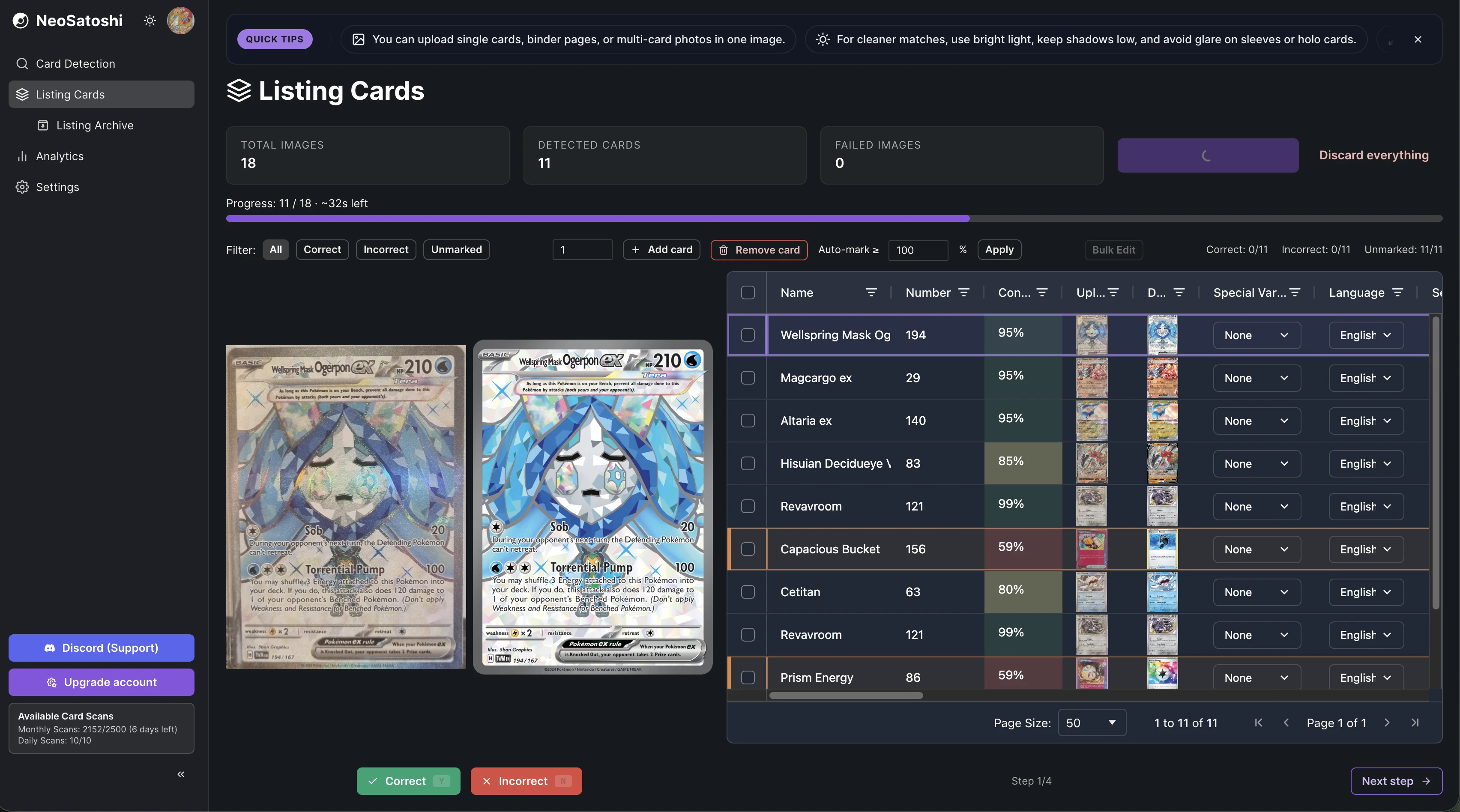
Upload a page of cards and see each card identified with name, set, number, confidence score, and market prices in a sortable table.
Search and correct with one click
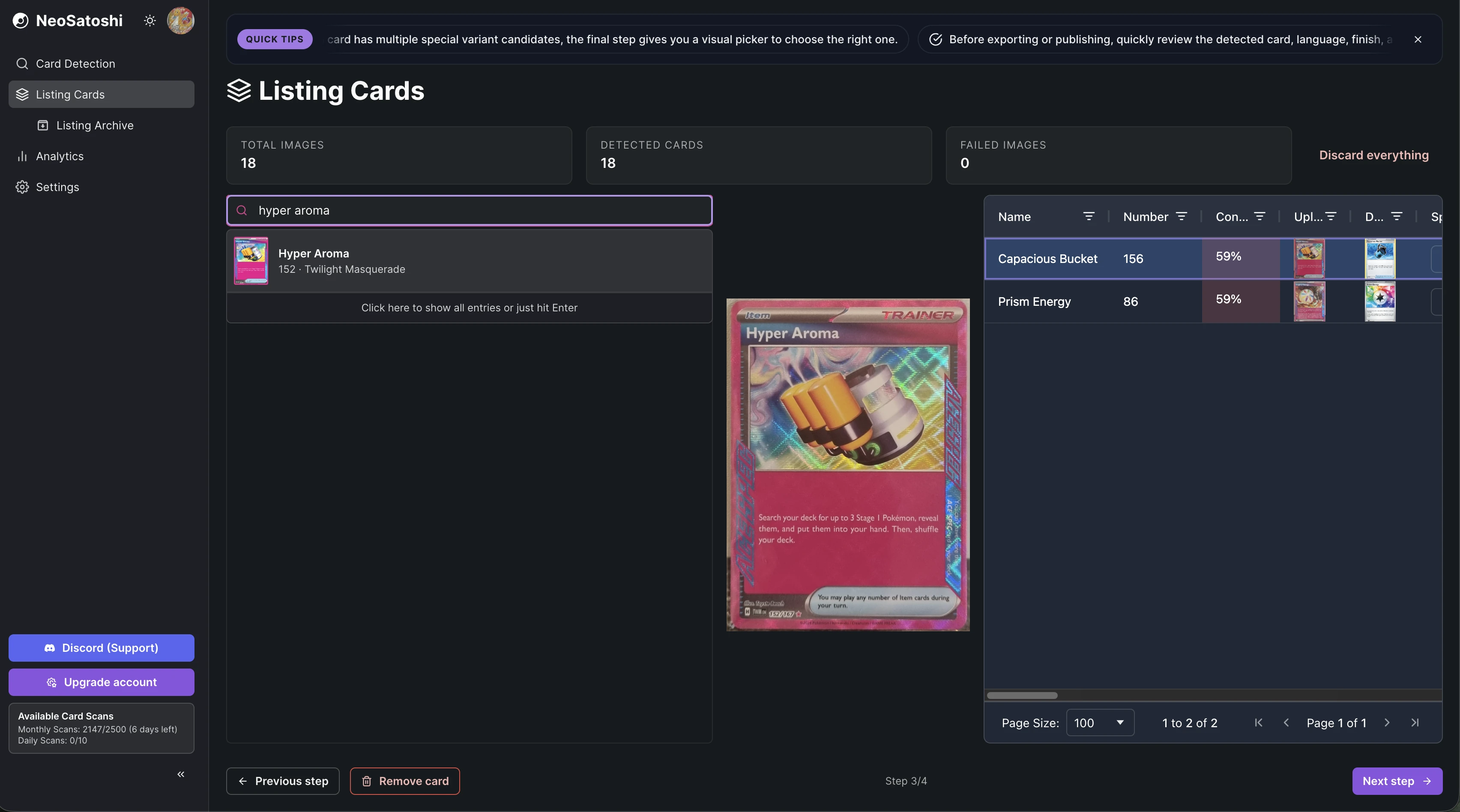
If a card needs correction, search by name and pick the right match. The card preview updates instantly so you can verify before moving on.
From photo to identified cards
Take a photo
Use your phone or camera to photograph individual cards or full pages. Good lighting helps, avoid glare and reflections.
AI detection
NeoSatoshi analyzes the image and matches each card against the database. You get set, number, color, type, and market prices.
Review matches
Confirm the matches or pick from alternatives. Once confirmed, your cards are ready for pricing and export.
Scanner questions
- Which languages does the scanner support?
- NeoSatoshi recognizes English and Japanese One Piece Card Game cards, and shows each card in its own language with the matching artwork. More languages follow as data becomes available.
- Can I scan alternate-art or parallel cards?
- Yes. The scanner detects the card along with its printing where data is available, including alternate art and parallel versions.
- How many cards can I scan per photo?
- A full page of cards works well. You can also scan individual cards. The system handles multiple cards per image automatically.
- Is the scanner free?
- Yes, you get free daily card scans. Paid plans include significantly more monthly scans for high-volume sellers.
Don't see your question?
Browse all answers
Guides for One Piece sellers
Where to sell One Piece cards: Cardmarket, eBay or Shopify
Which channel suits which cards and buyers, and how to use more than one without entering every card twice.
Read the answer
English vs Japanese One Piece cards for sellers
Why the two languages are separate products with separate prices, and how to list and price each copy.
Read the answer
How to list parallel and alternate art cards
How to tell the versions apart, list each one on its own product and price it from its own market.
Read the answer
Explore related seller workflows
Related use case
See the full One Piece bulk listing workflow, from photo upload and card matching to pricing and marketplace export.
Learn more
Related use case
Focus on the eBay-specific workflow for One Piece cards, including direct listing, CSV drafts, game-aware templates, and marketplace settings.
Learn more
Developers
Developers can call the same recognition engine directly: photo in, structured card JSON out. Test it with a free public demo key.
Learn more
Scan your One Piece cards, get listing-ready data instantly
Upload a photo of one card or an entire page. NeoSatoshi's AI identifies each One Piece card and gives you the data you need to list and sell.